Map images: which kind to make
The two downloadable course maps — high detail and decorative — and how to generate one.
A map image is a downloadable picture of one of your courses — a single image file you can print, email, or attach to a permit application. You pick a course, choose how it should look, and we render it for you.
This is a different thing from an Embedded Map. An Embedded Map is interactive — visitors pan it, animate the course, and toggle features on your site. A map image is a flat picture. You can print it, attach it to an application, put it in a race guide or a sponsor deck, or drop it straight onto your website as an image.
The two kinds
Every map image is one of two kinds. They share the same course, the same markers, and the same way of being generated — what differs is what they are for.
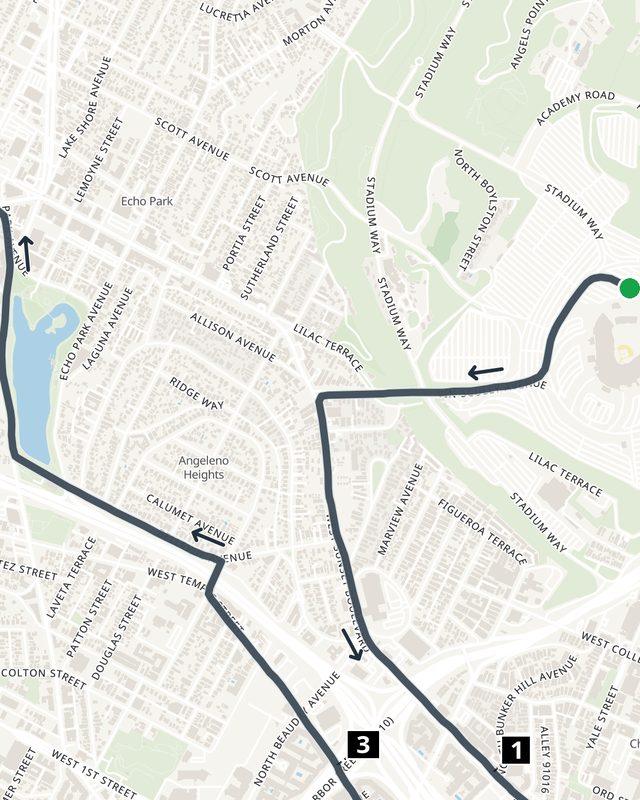
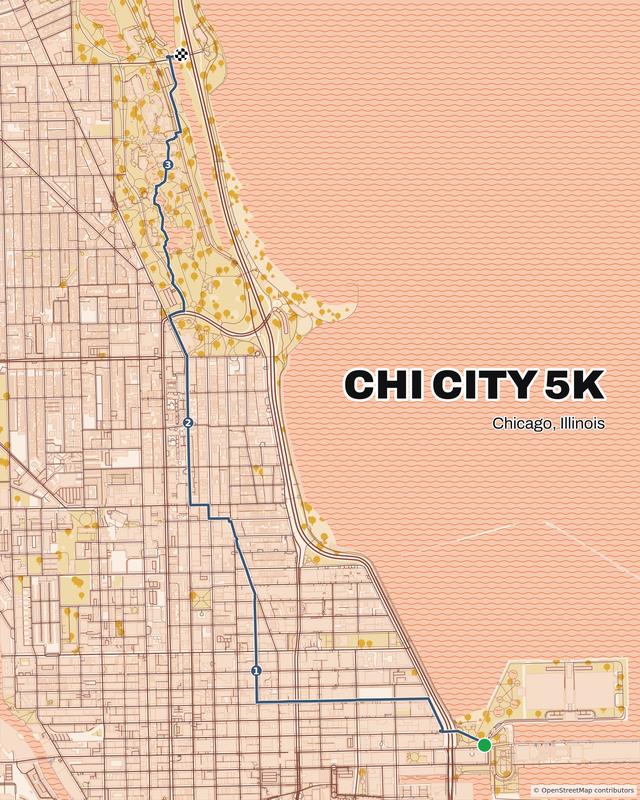
| High detail course map | Decorative map | |
|---|---|---|
| Looks like | A working street map, every street name legible | Stylized — bold colors, no clutter |
| Made for | The starting point for permit, police and council submissions; race-day briefings, aid-station packets | Social posts, race pages, newsletters, slides |
| Shapes | Letter, A4, square, widescreen, or fit to the course | Screen shapes, portrait or landscape (4:5, 3:4, 9:16, 1:1, 5:4, 4:3, 16:9) |
| Title on the map | No | Yes — title, subtitle, and a third line, all editable |
| Price | $15, one time | $9, one time |
Full walkthroughs: High detail course maps and Decorative maps.
Before you start: you need a course
A map image is always of something. You can use:
- a Race you direct or contribute to (see Creating Race courses), or
- a Route of your own (see Creating a Route course).
Whatever is on that course when you generate is what gets drawn — the GPS line, the start and finish, and your points of interest. If you want an aid station on the map, add it to the course first. See the points of interest edit page.
Three ways to start one
- From a Race page. Click the Image button in the toolbar. The course is already chosen for you.
- From your profile sidebar. Under Images, click Create.
- From the Map images page itself. Click New map image.
All three open the same short menu — “Choose a map image” — where you pick high detail or decorative. If you started from the sidebar or the index, the next page asks you to search for one of your races or routes.
Generating, and how long it takes
When you press Generate preview, the work happens on our servers rather than in your browser. You’ll see a progress bar naming each stage as it goes, and you’ll be taken to the finished map when it’s done.
Expect minutes, not seconds. A few things make the first map of a new area slower: our map servers may need to start up, and if nobody has made a map in that part of the world recently, the underlying map data is built from scratch. Later maps of the same area are much quicker.
You don’t have to sit and watch it. Click Email me when it’s done and close the page — the render keeps going, and the finished map appears in your map images list either way. Closing the page never cancels a render.
Free previews
Every map starts as a free, watermarked preview. Generate as many variants as you like — different shapes, colors, marker choices — and only pay for the one you want to keep.
High detail maps have a fair-use allowance of 15 free previews per account per 24 hours. It resets on a rolling basis, and the page tells you where you stand as you get close. It exists to stop runaway rendering, and normal work — trying several versions of one race map — never comes near it. Editing a map you’ve already bought doesn’t count against it.
Then what?
Once you’re happy with a preview, one payment removes the watermark and unlocks the full-resolution file. That side of things — the price, the subscription credit you earn, what happens when the course changes afterwards — is covered in Buying, downloading, and updating a map image.